









TeamViewer software is a powerful remote control application that provides users with convenient remote desktop access, file transfer and device management solutions. This software uses secure and stable connection technology to allow users to remotely control other devices anytime, anywhere, as if they were operating directly in front of the device. Whether it is technical support, remote working or device management, it can be completed efficiently through this tool. It supports cross-platform use, can establish connections between different operating systems and devices, and provides a variety of practical functions to improve the efficiency of remote collaboration.凭借其可靠性和易用性,TeamViewer 已成为远程连接领域常用的工具之一。
软件特色
1. The global distributed server network optimizes connection routing and can maintain stable transmission even in low-bandwidth environments, ensuring high-definition image quality and fast file transfer experience.
2. Use enterprise-level security mechanisms such as 256-bit AES encryption and two-factor authentication, combined with conditional access and single sign-on functions to ensure that remote connections and data transmission are safe and controllable.
3、覆盖120多家设备厂商及各类操作系统,支持PC与移动设备跨终端连接,适配物联网、无头设备等特殊场景。
软件亮点
1、无缝集成主流办公、管理软件,可与团队协作工具、IT资产管理系统联动,适应个人、团队、大型企业等多种使用场景。
2.支持无人值守访问模式。授权后即可直接连接远程设备。借助脚本自动化功能,您可以一键执行重复性任务,降低人工操作成本。
3.创新的AR远程支持功能,通过实时字幕、翻译和AI摘要辅助沟通,并可以标记现实生活场景指导设备操作,大大提高远程解决问题的效率。
软件优势
1. It has device monitoring and alarm functions, which can track the operating status of remote devices, receive exception reminders in a timely manner, and provide remote patch management and system maintenance tools.
2. Provide high-speed file transfer function, support large file compression transmission and breakpoint resume transfer, can manage remote device files in batches, and realize cross-end copy, move and delete operations.
3. Achieve full-screen remote desktop control, support mouse and keyboard mapping and touch operation adaptation, enable real-time viewing and control of the remote device desktop, and accurately execute various operating instructions.
软件教程
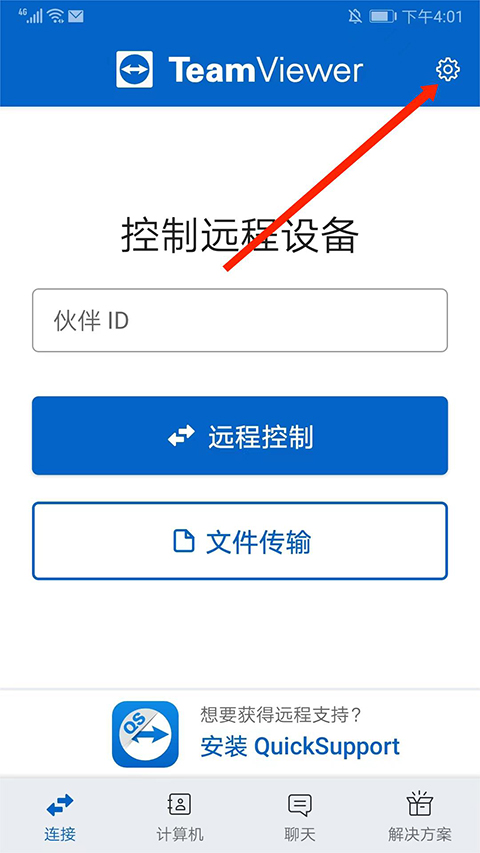
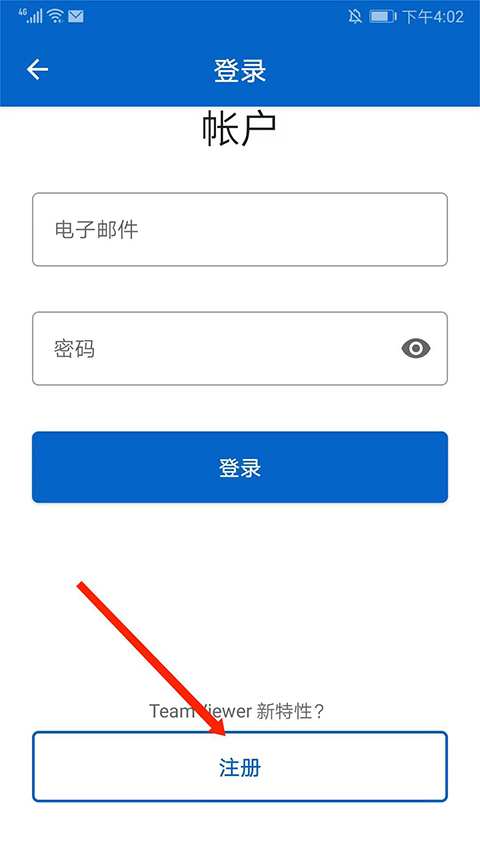
1.安装软件后,打开它,进入主页,选择右上角的“齿轮”图标。
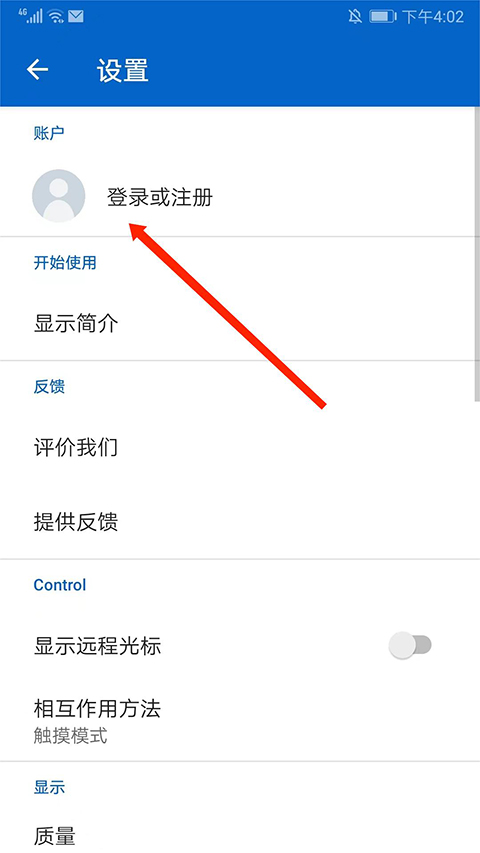
2. 进入设置界面,选择“登录或注册”选项。
3. 向下滑动并选择下面的“注册”选项。
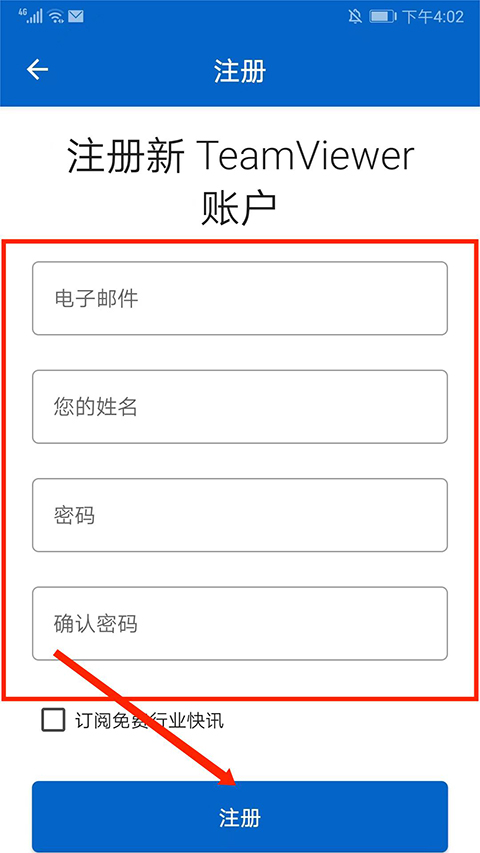
4. After filling in the "email address", "name", "password" and "confirm password", select "Register" below.
软件测评
TeamViewer软件在连接稳定性和功能完整性方面具有出色的表现,可以满足从简单的远程协助到复杂的设备管理的各种需求。 Cross-platform compatibility allows users to seamlessly switch between different devices, while security mechanisms provide reliable protection for remote operations.文件传输、远程打印等实用功能进一步增强了工具的实用性,特别适合需要频繁远程协作的场景。





-
做超声检查时,医生为什么要在患者肚子上涂粘粘的东西 2026-02-09
-
小米mix fold有前置摄像头吗 2026-02-09
-
绯红之境兑换码最新2021 礼包兑换码大全 2026-02-09
-
天地劫幽城再临归真4-5攻略:第四章归真4-5八回合图文通关教学 2026-02-09
-
阴阳师4月22日更新内容:帝释天上线技能调整,红莲华冕活动来袭 2026-02-09
-
妄想山海怎么加好友 加好友方法大全 2026-02-09